Running the demo
The demo workspace is deliberately almost empty — just an AGENTS.md (the project's conventions) and a .gitignore. It exists mainly as a git repo, which is all Tilth needs to do what it always does: branch off a worktree and build inside it. The path mirrors what a real first-time user does — author the feature as markdown in a feature directory under .tilth/, then point tilth run at it. Nothing is pre-baked; the todo CLI gets built from scratch during the run.
Clone the demo workspace
Path used on this page. Commands below use
~/projects/tilth-demoas an illustrative location, andtodo-clias an illustrative feature name. Tilth doesn't care where the workspace lives or what you call the feature — you pass the feature directory's path and it derives the enclosing repo — so substitute any directory that matches your setup. Treat the demo repo as a stand-in for your own.
Author the feature
Tilth runs from a feature directory you place in the target repo at <repo>/.tilth/<feature>/ — you name the feature directory, so one repo can hold several features side by side. There's no interview step inside the harness; instead, the recommended way to produce this directory is the tilth-feature-author skill — a Claude Code skill that scans your repo, interviews you, and writes the directory in the format below. For the demo you can also just hand-write a small one; either way the harness runs identically, and the shape is:
.tilth/todo-cli/
├── overview.md            # the feature's goal + scope boundaries (required)
├── T-001-<slug>.md        # one file per task, ordered by id
├── T-002-<slug>.md
└── ...
Each task file is small frontmatter plus two sections — a description in the worker's voice, and externally checkable acceptance criteria:
---
id: T-001
title: Add the `add` subcommand
---

## Description
What to build, in the worker's voice. Real paths/symbols
(todo_cli/__main__.py:main()), not "the entrypoint".

## Acceptance criteria
- An externally checkable behaviour
- Another one
If the directory is missing (or malformed), tilth run fails fast before creating any session and prints ready-to-fill templates for overview.md and a task file — so the cheapest way to learn the shape is to just run it once. The full format reference (parsing rules, what's required, who reads each field) is The task format.
For the demo, try a feature like "a minimal todo CLI with add, list, and done subcommands, on-disk format - [ ] item in TODOS.md", sliced into three or four tasks. The demo repo is near-empty, so this is a greenfield/MVP build — a case the tilth-feature-author skill handles directly, folding in the scaffold, test-harness, and README tasks a from-scratch build needs.
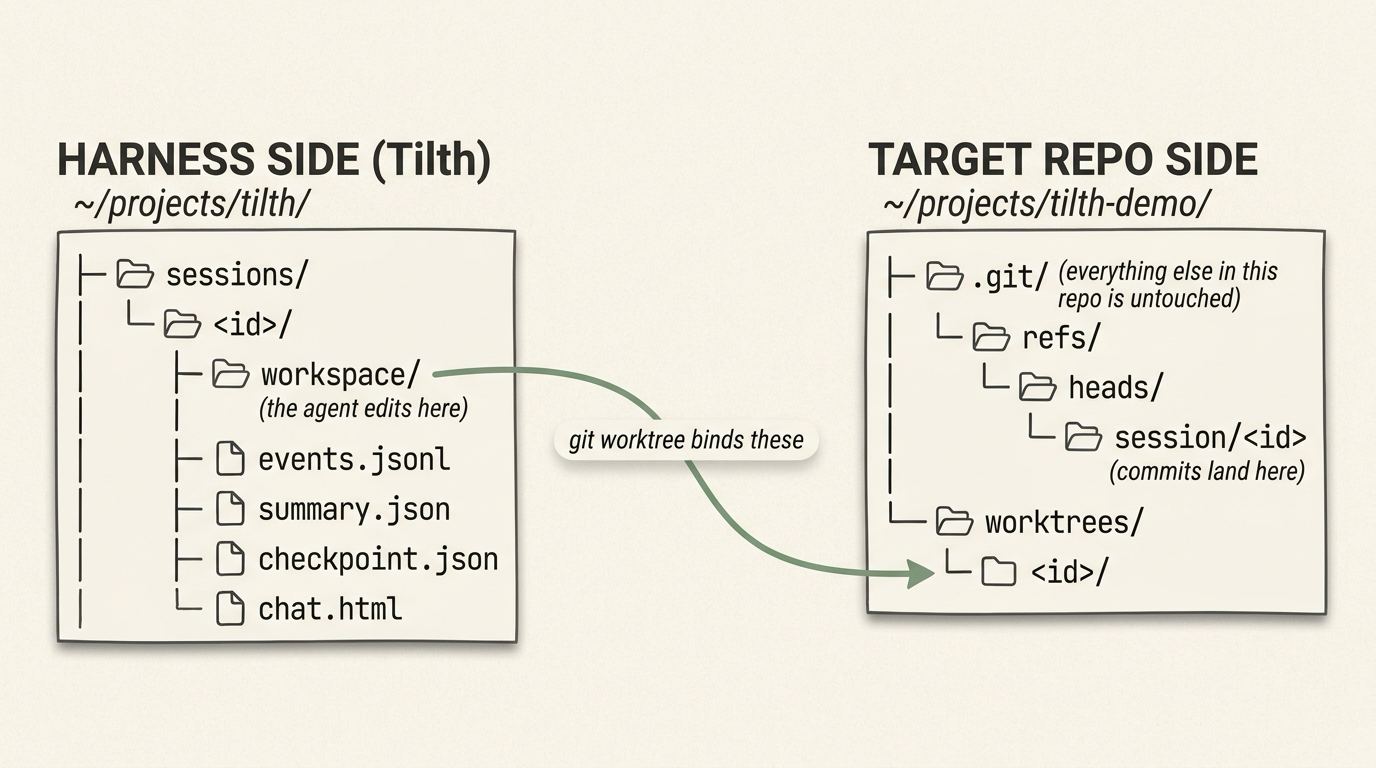
Where a session's state lives. Everything the harness writes — the event log, the status overlay, the summary — sits under Tilth's per-user data dir (~/.tilth/sessions/<id>/); only the session/<id> branch and its worktree admin entry live in the demo repo's .git. The task markdown you authored stays in your repo, where you put it. Full breakdown in Session layout.
Run a session against the demo
What happens, end-to-end:
- Tilth reads the feature directory you pointed it at and derives the enclosing git repo for the worktree (failing fast with templates if the directory has no feature).
- Creates a fresh session and a worktree of the demo repo. The working tree lives at
~/.tilth/sessions/<id>/workspace/(in Tilth's per-user data dir, outside the demo repo); the new branchsession/<id>is registered in the demo repo's.git. The two halves live in different places by design — see Session layout for the why. - Loops through pending tasks in order. For each task:
- Reset context. Prompt = system + project context (
AGENTS.md/CLAUDE.md) + recent progress + the feature overview + the full plan (as context) + this task (and, on a retry, the evaluator's prior verdicts on it). - Tool-loop with the worker model (bash, file ops, search) until it calls
submit_caseto present its finished work. - Evaluator model reviews the case + diff in a fresh context (it also sees this task's prior verdicts). Rejections get fed back as structured feedback. The evaluator is the only gate — there is no codified test/lint step; the worker is told to verify its own work via
bashbefore presenting it. - On accept: commit on the worktree branch, append to
progress.txt, mark the taskdonein the harness's status overlay.
- Reset context. Prompt = system + project context (
- Stops on: all tasks done, iteration cap, wall-clock cap, dollar-spend cap, evaluator-call cap, or a terminal failure (e.g. a provider returning empty responses, or the worker never presenting a case).
You can interrupt at any point with Ctrl-C. Ctrl-C and cap hits (iteration, wall-clock, dollar-spend) all leave the run in a resumable state — see Resuming & resetting to pick it back up. Of the three caps, only the dollar-spend cap needs attention before you resume: the cumulative spend carries across resumes, so if TILTH_MAX_TOKEN_DOLLAR_SPEND is what stopped the run, raise it in ~/.tilth/.env first or tilth resume trips it again on the first check. The wall-clock budget resets per resume, and the iteration cap is per-task (a retried task starts counting from one), so neither blocks a resume unless the work genuinely needs a bigger budget — see What resume does.
What you should expect to see
The console streams every tool call as it happens. The per-task loop has the shape below:
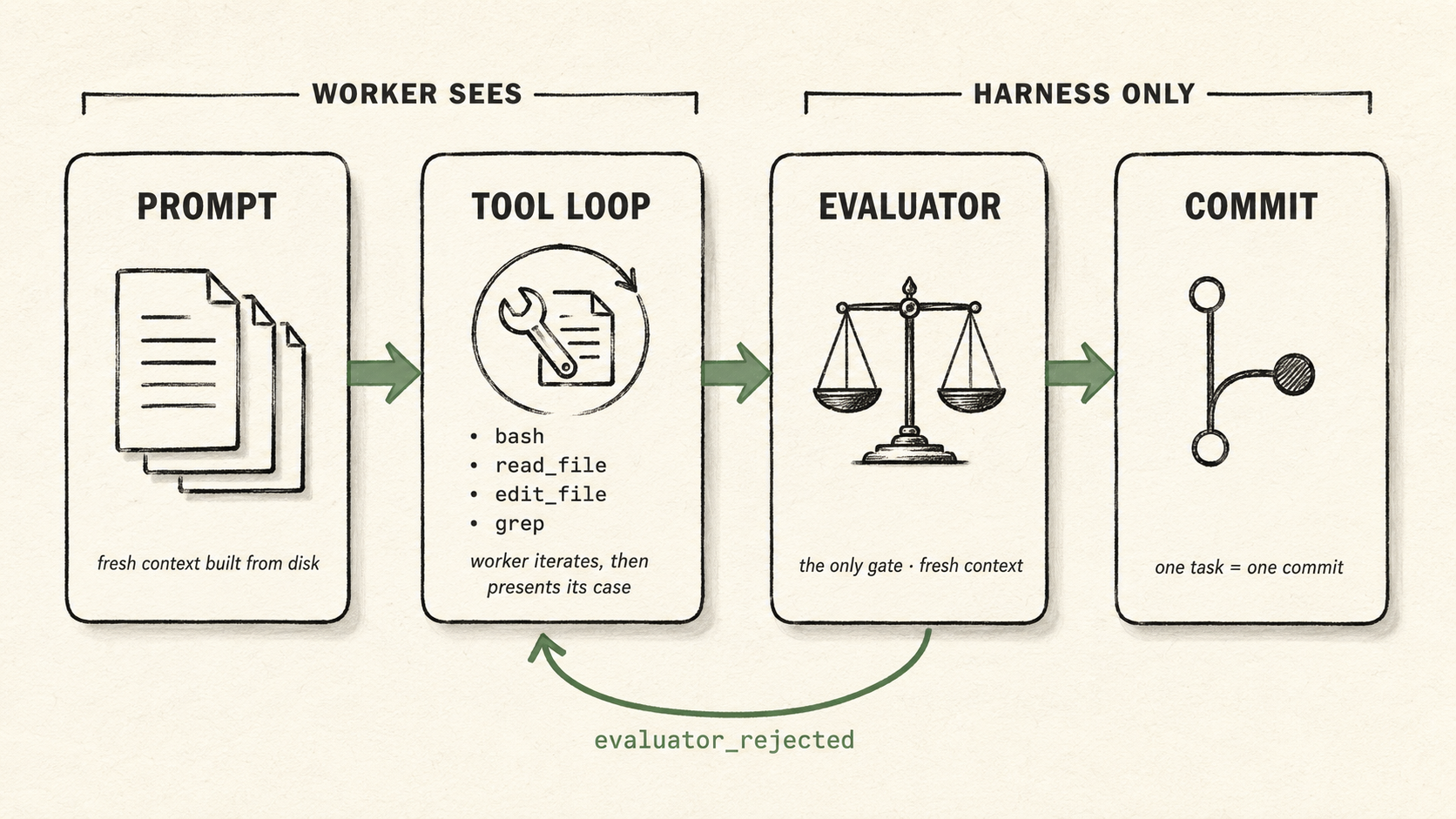
One task's lifecycle inside the harness. The worker sees the Prompt and the Tool Loop; the evaluation machinery stays harness-side. A rejected evaluator verdict feeds back into the Tool Loop for another iteration.
A clean run ends with every task marked done and a commit-per-task on the session/<id> branch. When the loop doesn't track this cleanly, watch for these patterns:
- A task spinning is signalled by the same files being read and re-written across iterations. If it happens, kill the run and rewrite the task description before retrying.
- Evaluator rejection loops show as repeated
evaluator rejects → next iterationpatterns. A handful is normal; a long string usually means the acceptance criteria are misaligned with the task description — the worker keeps satisfying one reading while the evaluator holds the other. Sharpen the task file.
After the run
Once every task is done, the harness closes out the final task and prints all tasks complete followed by a run summary:
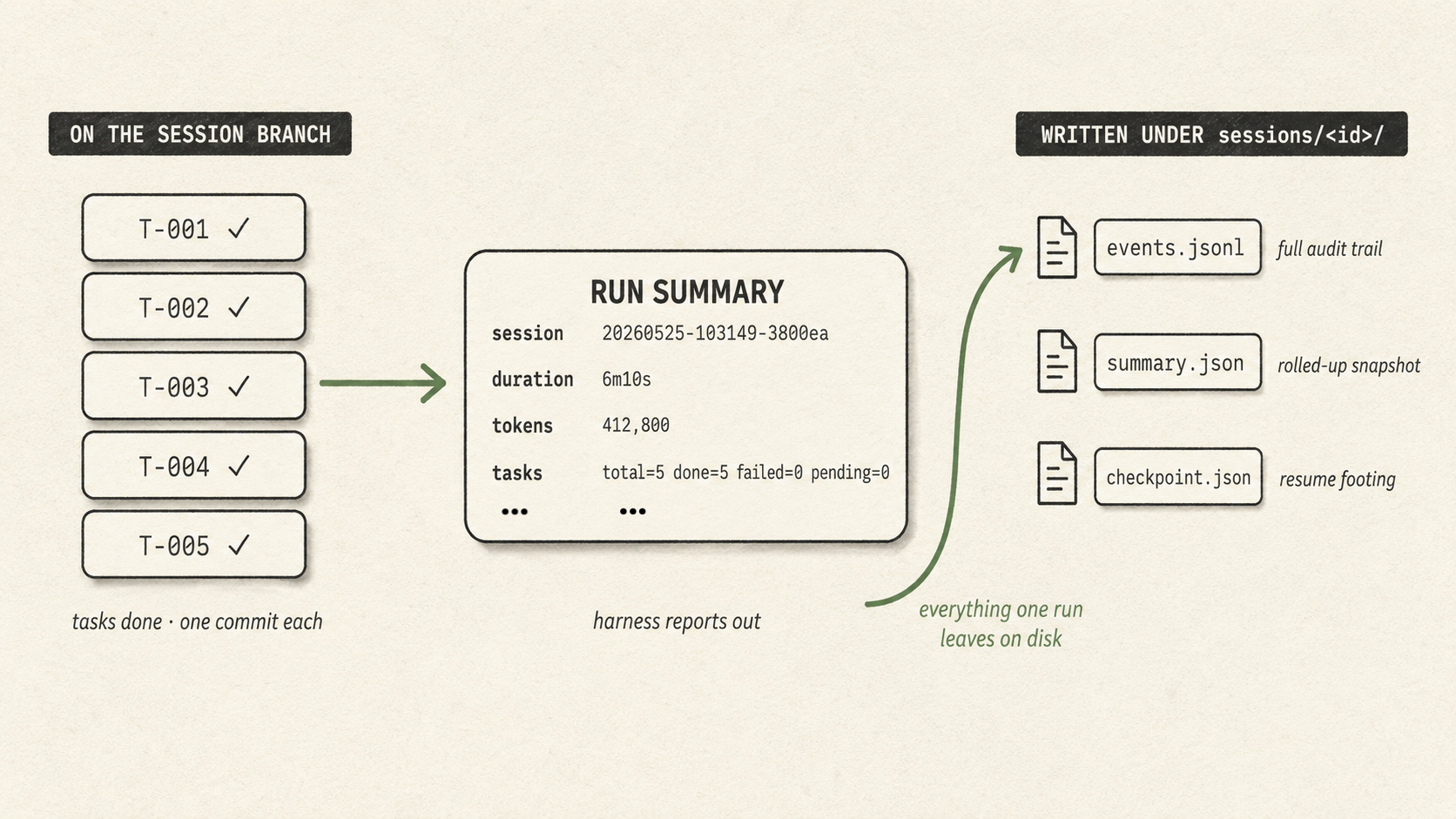
A clean ending. Every task is committed on the session branch (left); the run summary tallies what happened (centre); and the artifacts the run wrote under ~/.tilth/sessions/<id>/ — the event log, the rolled-up summary, the resume checkpoint — sit on the right, outside the worktree for you to read or resume from. Your AGENTS.md and .tilth/<feature>/ are never touched by the run.
To inspect what just got committed:
Each task is one commit. If you like the work, merge it into main like any other branch; if not, delete the branch. The harness never auto-merges. (You can also use tilth reset to throw away the worktree, branch, and the harness's session directory in one shot.)
The session log lives at ~/.tilth/sessions/<id>/events.jsonl — every model call, tool call, and evaluator verdict is recorded (see Session layout → Event types for the full taxonomy). Alongside it, ~/.tilth/sessions/<id>/summary.json carries a rolled-up snapshot (token totals, per-task iteration counts, tool histogram, hook outcomes, evaluator accepts/rejects with rejection categories) refreshed at every task boundary — read that when you want a quick stat without jq-ing the full log.
For a more readable view of a finished run, see Visualizing a session.