Tilth
Prepare the ground, let the agent grow the work.
A minimal long-running agent harness against an OpenAI-compatible LLM endpoint. Tested today against OpenRouter; the OpenAI SDK underneath means other OpenAI-flavour gateways should work, but support for them is on the roadmap rather than validated. Built to learn (and demonstrate) the Brain/Hands/Session split, the Ralph loop, and the file-backed memory channels described in Addy Osmani's long-running agents and agent harness engineering posts.
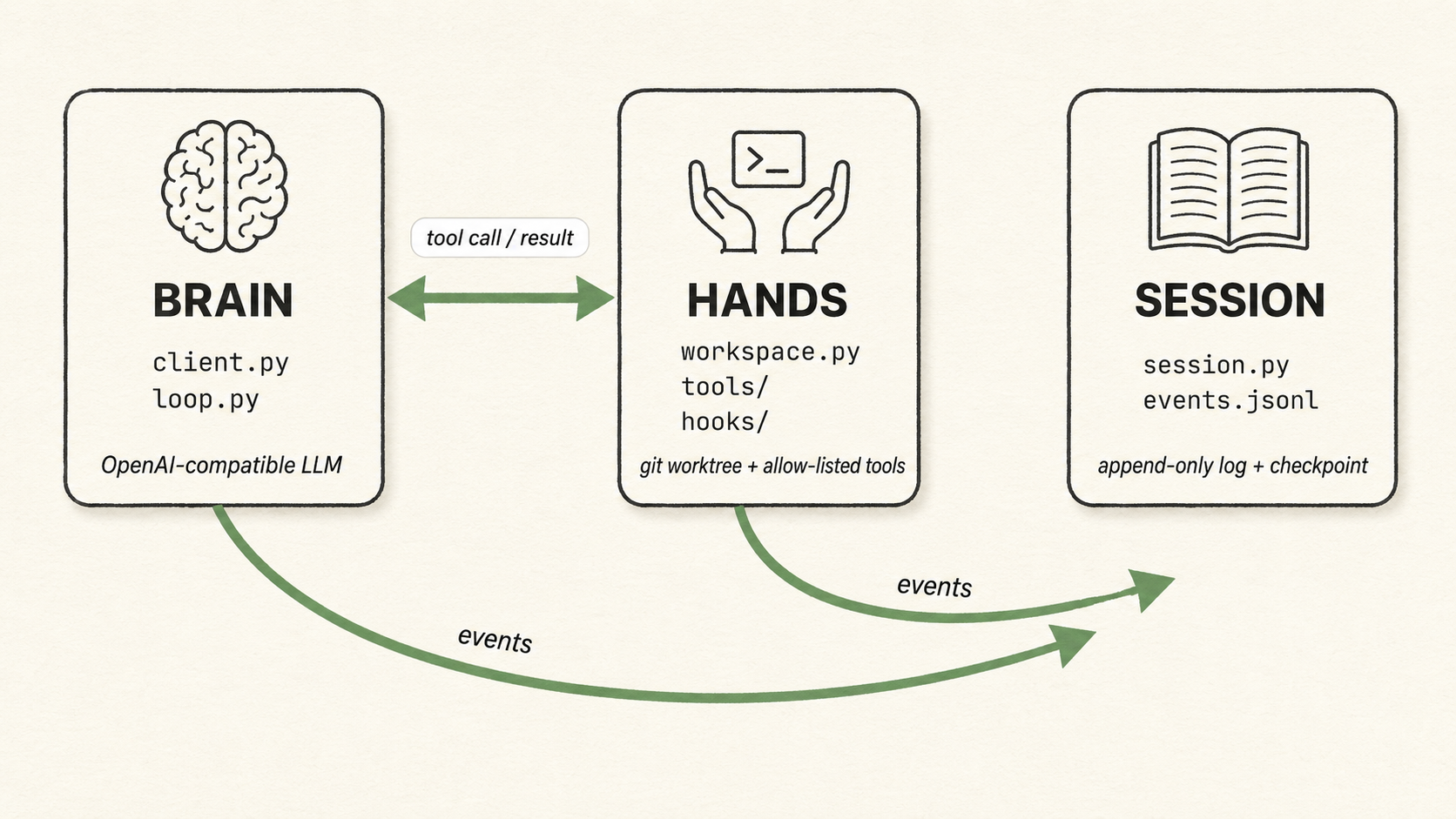
Brain / Hands / Session
Audience: This is an active research project for my work in Altered Craft. I do actively use it for real work, so I would advise it for single-dev / few-dev teams who want to understand what a long-running agent harness actually does. That is today (June-2026), in the future, we shall see.
Target run: I test with 10-60 minutes of autonomous work against an open model (default deepseek/deepseek-v4-flash on OpenRouter for the worker; the evaluator defaults to deepseek/deepseek-v4-pro). Completing a short task list against a small project on a per-session git worktree.
Status — prompt-driven core. Tilth is deliberately small and currently being driven down to its essentials: a worker and an independent evaluator, the base file/search/bash tools, and full observability. There is no codified test/lint gate — the evaluator is the only gate — and no interview step baked into the harness: you point
tilth runat an authored feature directory under<repo>/.tilth/<feature>/. The interview lives outside the loop, as the optionaltilth-feature-authorskill that writes that directory for you. Capabilities get added back only as testing shows they're needed.
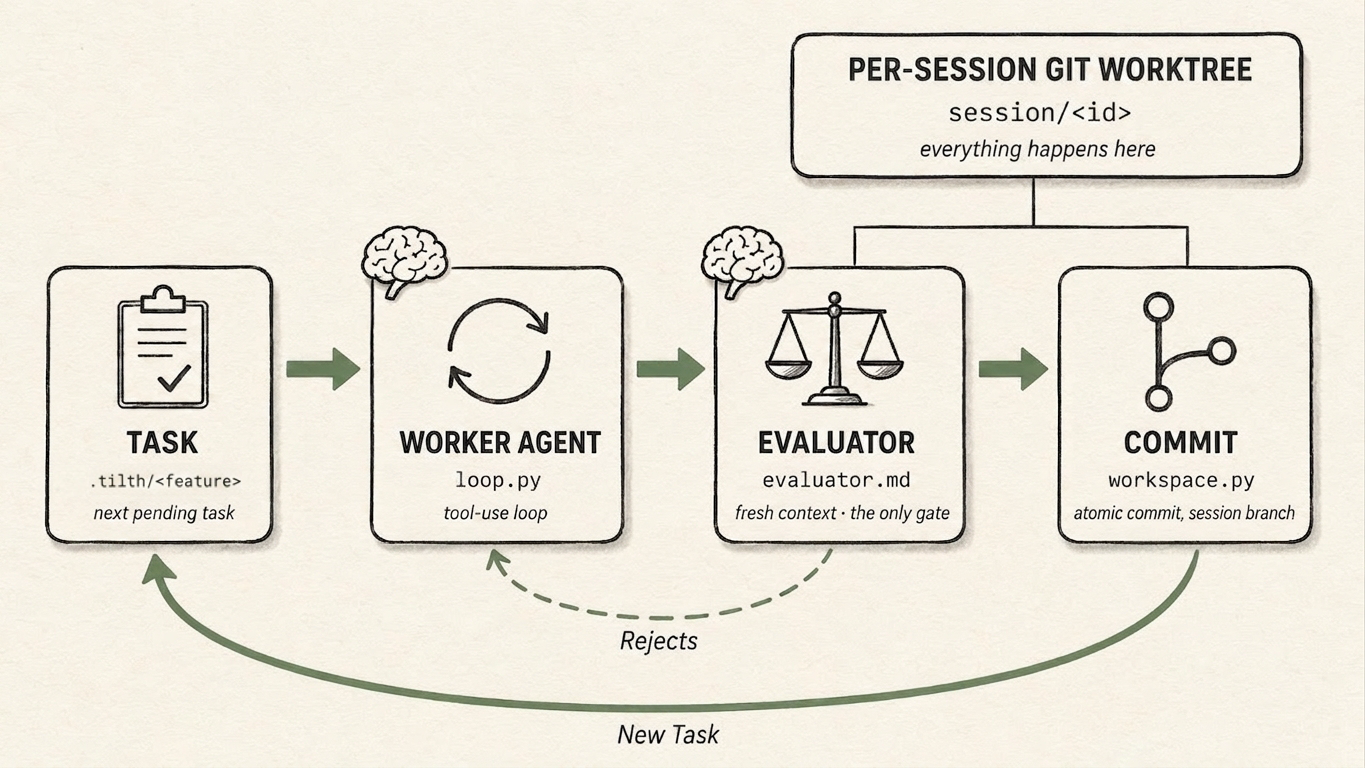
The harness loop
What is a harness?
A harness is the deterministic code wrapped around the model — it decides what the model sees, when it runs, and what happens to what it produces. The model is the brain; the harness is everything around it that turns a single model call into a loop that finishes work.
The labels under each box in the diagram above are that harness, made literal: loop.py and workspace.py are Tilth's code; .tilth/<feature>/ is the work you authored; evaluator.md is the prompt it hands to a second model. The harness owns the arrows — the forward path, the dashed Rejects feedback, and the green New Task loop. It picks the next task, routes the evaluator's verdict, commits to the session branch, and moves on. That green New Task arrow is the Ralph loop proper — the outer loop that carries a session from one task to the next.
The model owns only what happens inside a box:
- the worker agent's tool use — which tools to call, and when to
submit_case; - the evaluator's verdict —
acceptorreject(the model decides it; the harness routes it onto an arrow).
That boundary is the point of an autonomous harness: the agent acts within a step, the harness orchestrates the steps, and the agent never steers the loop or sees the machinery driving it. For the code-level version — the two nested loops, the caps, and what the agent can and can't see — see The two loops and Agent visibility.
How Tilth differs from other harnesses
Tilth is informed by the minimal-harness lineage — small system prompt, a handful of tools, state in files — but it makes one different bet: it runs autonomously. Many minimal coding agents are interactive: a developer watches the scrollback and course-corrects, kills a bad run, or re-prompts mid-task. Tilth removes that human for the length of a run (10–60 min).
Almost everything distinctive about Tilth follows from that one difference. Each piece stands in for a call a watching human would otherwise make:
- The evaluator — a second model that judges whether a change is a proper solution against the task's acceptance criteria, not just whether the code runs. There is no codified test/lint gate in front of it; the evaluator is the reviewer who isn't in the room, and the only gate.
- Between-task caps — the budget ceiling (iterations, tokens, wall-clock) a human would otherwise impose by noticing a runaway and stopping it.
- State kept out of the model — the mutable status machinery is hidden, so an unattended agent can't mark its own work done, skip ahead, or rewrite the queue.
- Hyper-observability — when no one is watching mid-run, the recording is the supervision. Every prompt the harness sends is recorded and every run replays end-to-end from its
events.jsonl(tilth visualize). Offline-first by design: a finished run you inspect, not a live TUI to babysit.
None of this is a knock on interactive agents; it's a different shape for a different job.
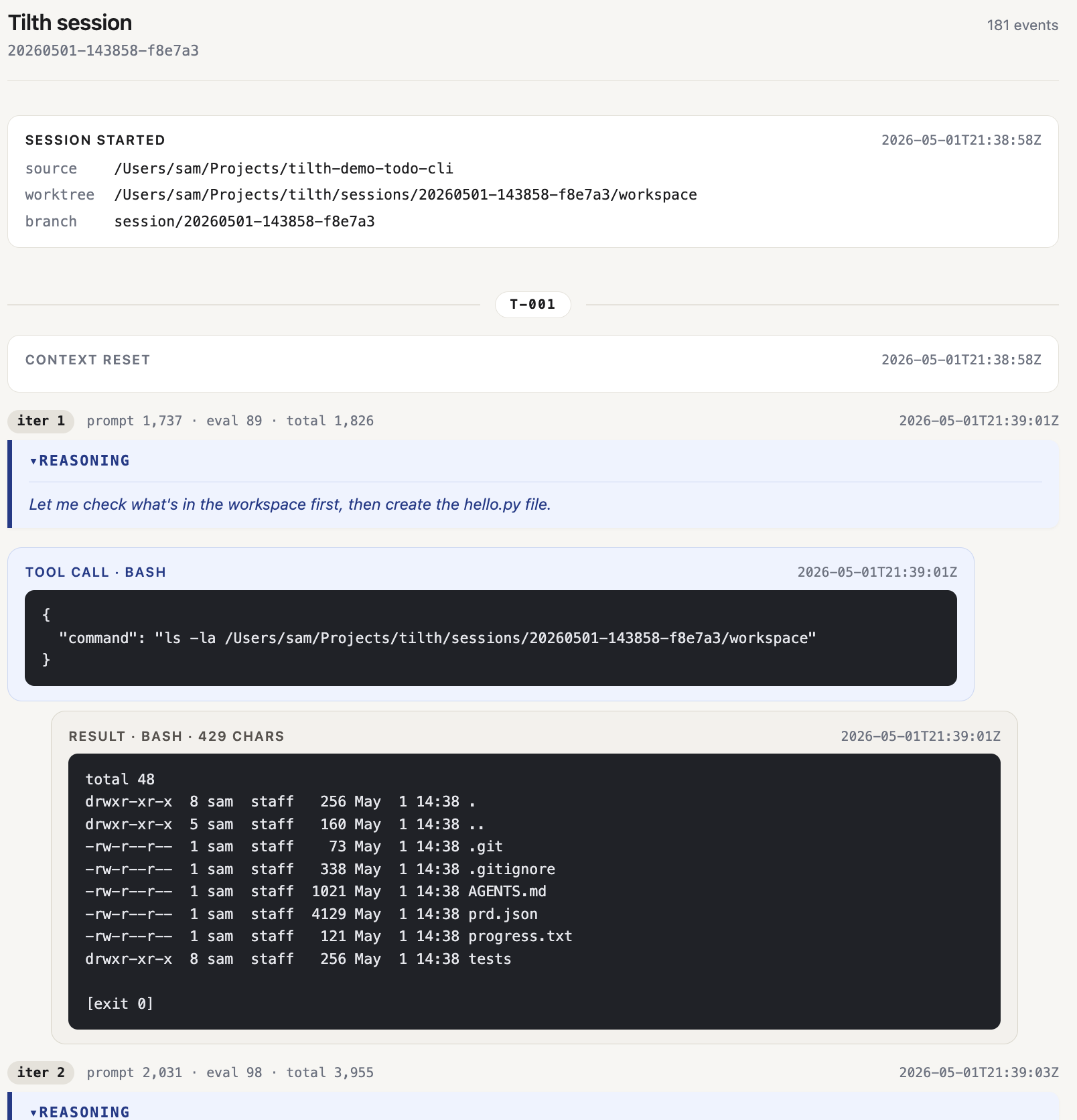
Every run — streaming live or replayed after the fact — is browsable as a chat-style web app with tilth visualize. When no one is watching mid-run, the recording is the supervision.
What's in these docs
- Getting started — install, author a feature under
.tilth/<feature>/(with thetilth-feature-authorskill or by hand), run the demo, visualize / resume / reset a session. - Architecture — the Brain / Hands / Session split, the memory channels, and what the agent sees (and doesn't).
- Deep dives — hyper-observability and
tilth visualize, the two loops and what can stop a run, the worker↔evaluator dialogue, token recording, the task format, session layout. Honest, code-level walk-throughs for extending, debugging, or reasoning about the safety story. - Reference — safety guards.