Anatomy of a run
The overview tells you who does what — Brain reasons, Hands act, Session records. This page tells you what flows through: the artifacts the per-task loop reads to do its work, and the ones it leaves behind.
A Tilth run is, in the end, a function over files. It reads a fixed set of inputs, turns the loop once per task, and writes a fixed set of outputs — and three of those outputs feed straight back in as the loop's working memory. Getting that shape in your head first makes the deep dives easier to place.
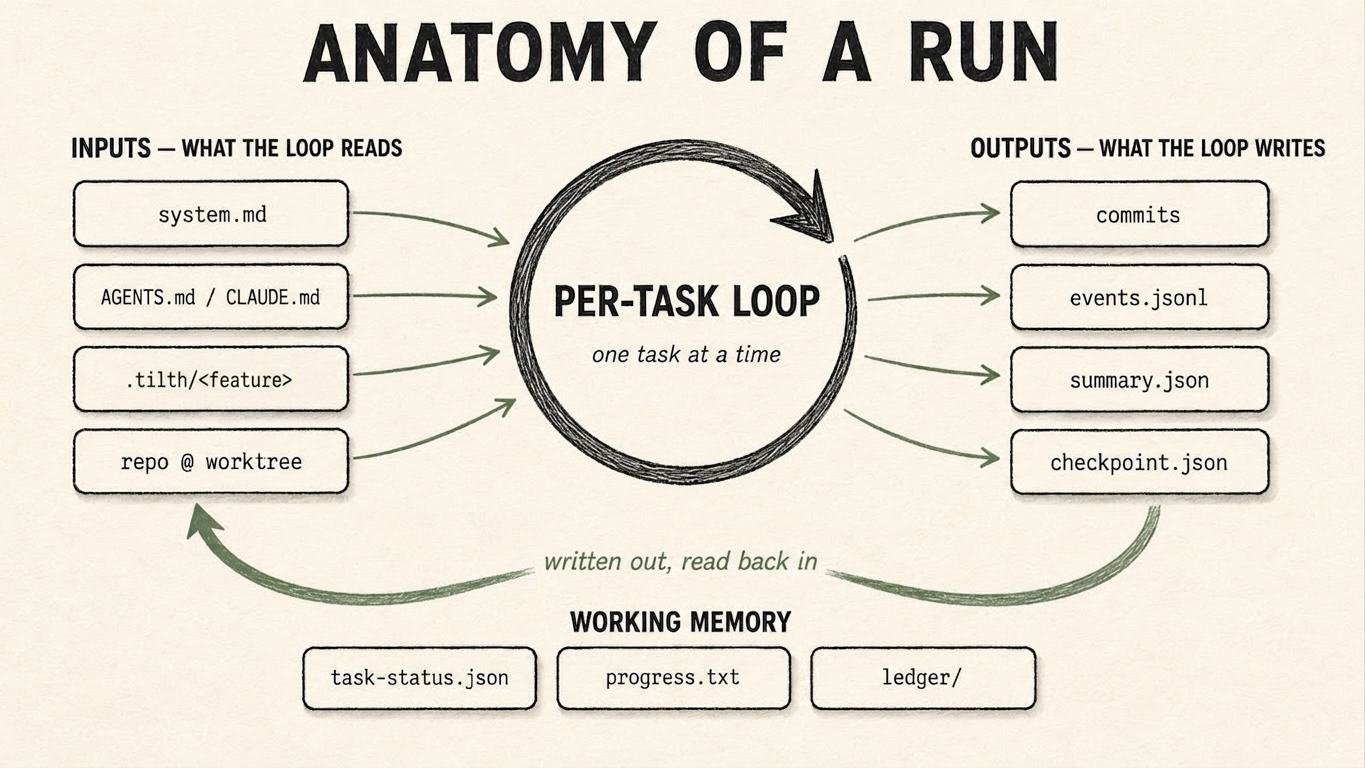
A run as a function over files: the per-task loop reads its inputs (left), turns once per task, and writes its outputs (right). Three artifacts — task-status.json, progress.txt, and the evaluator ledger/ — are written out and read back in as the loop's working memory (the lower arc).
The split below mirrors that diagram: pure inputs, the loop, pure outputs, and the three artifacts that are both.
Inputs — what the loop reads
Read-only, from the loop's point of view. All are authored before the run — by you (AGENTS.md, the task markdown) or shipped with the harness (system.md). The loop consumes them; it doesn't edit them.
| Artifact | Lives in | Read by | Carries |
|---|---|---|---|
system.md |
tilth/prompts/ (harness) |
worker (its system prompt) | the worker's role, tool guidance, the advocate framing |
AGENTS.md / CLAUDE.md |
the workspace root (user-owned; list configurable via TILTH_CONTEXT_FILES) |
worker, evaluator | your project's conventions |
.tilth/<feature>/overview.md |
the workspace (user-authored) | worker, evaluator | the feature's goal, context, and scope boundaries |
.tilth/<feature>/T-NNN-*.md |
the workspace (user-authored) | worker (its task + the full plan as context); evaluator (the task under review) | per-task description + acceptance criteria |
| the source repo | the worktree | worker, via Hands | the code the run changes |
The instructions (system.md, the context files) and the work (the overview, the task files) are assembled into each fresh task prompt. What the worker actually sees, versus what stays harness-only, is its own subject — see Agent visibility. For the input channels in depth, see Memory channels; for the authored format, see The task format.
The loop — what turns
Between read and write sits the loop you came here to run. Its mechanics live elsewhere — The two loops for the Ralph (outer) / tool-use (inner) split — but the per-task shape is:
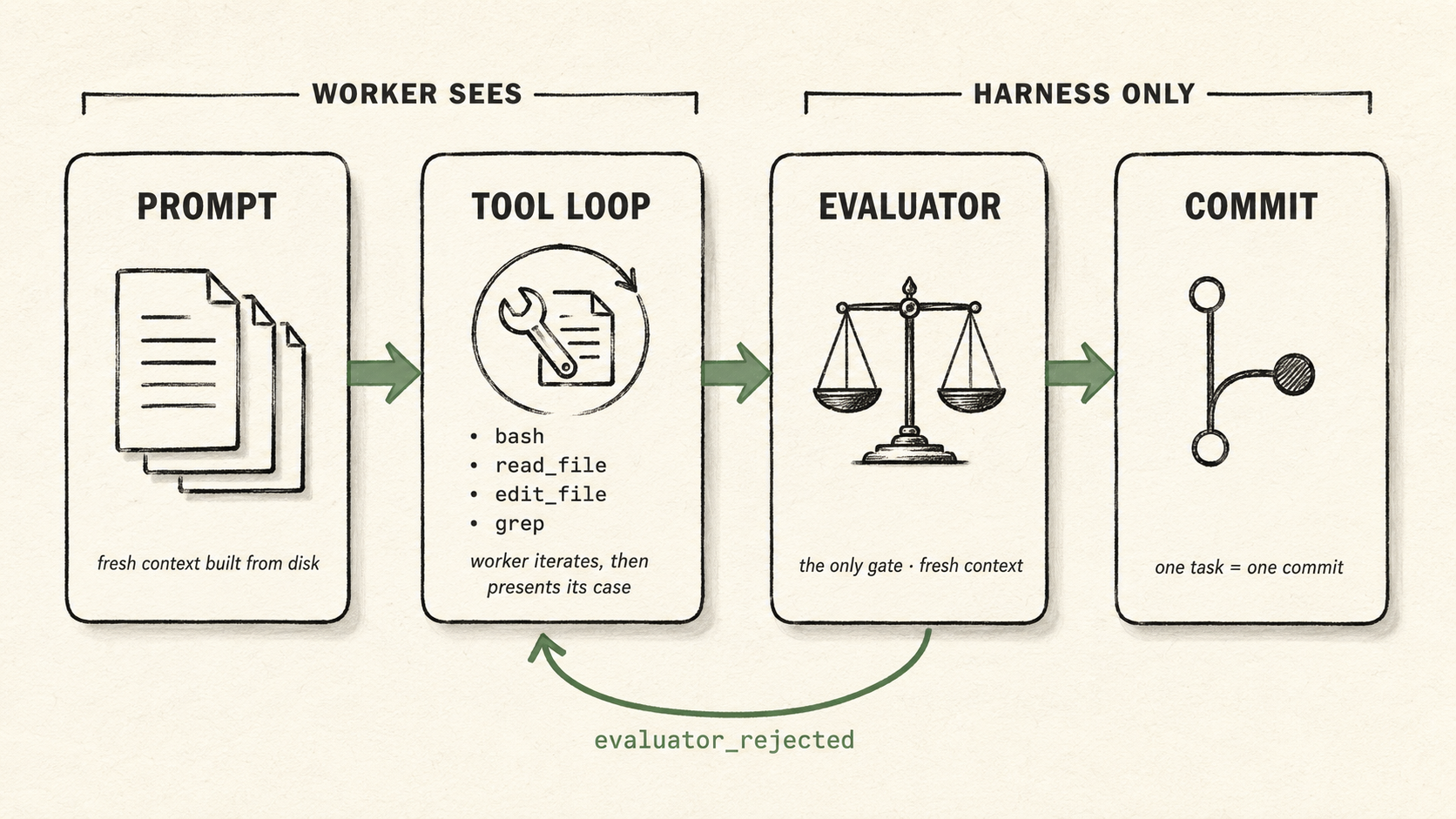
One task's lifecycle. The worker sees the prompt and the tool loop; the evaluator and the commit are harness-side.
This page stays out of those internals. What matters here is that each turn reads the inputs above and produces the outputs below.
Outputs — what the loop writes
Written by the harness as the run proceeds. The worker writes none of them directly — it writes code, which the harness commits. They exist for the human reading the run afterwards, and for tilth resume / tilth visualize.
| Artifact | Lives in | Written | Read afterwards by |
|---|---|---|---|
commits on session/<id> |
the source repo's .git |
one per accepted task | humans (review + merge); evaluator (via the diff) |
events.jsonl |
sessions/<id>/ |
append-only, every step | humans; tilth visualize; tilth resume |
summary.json |
sessions/<id>/ |
rebuilt at each task boundary | humans; the visualizer; external consumers |
checkpoint.json |
sessions/<id>/ |
as the run proceeds (it carries the running token total, so it rewrites after each model call) | tilth resume |
Where each lives on disk — and the full events.jsonl event taxonomy — is in Session layout. The branch is never auto-merged; you review and merge it like any feature branch.
One thing the loop doesn't produce is the session view: tilth visualize is a separate read-only web app rendering events.jsonl on demand (live during a run, or replayed after). It's an out-of-band observer, not part of the loop — which is why it sits outside both this table and the diagram.
Working memory — the artifacts that are both
Three artifacts are written by the loop and read back by the next turn. They are how a run keeps continuity when each task starts from a fresh context, and across tilth resume in a brand-new process: the state lives on disk, not in the model's head.
| Artifact | Lives in | Written | Read back by |
|---|---|---|---|
task-status.json |
sessions/<id>/ |
the harness flips status per task (done / failed; absent = pending) |
the harness (next-task selection); the worker sees each task's status in the plan-as-context |
progress.txt |
sessions/<id>/ |
one line per task outcome | the worker (last ~30 lines, next task) |
ledger/<task_id>.jsonl |
sessions/<id>/ |
one entry per evaluator call | the evaluator (its prior verdicts, next iteration); the worker (on a retry) |
This is the loop's durable working memory — the sage-green arc in the diagram. It is also why a run survives interruption: stop it at any point and the next process reads these three back and picks up where it left off. See Resuming & resetting.
Note the asymmetry with the task content: the descriptions and acceptance criteria stay in your repo's .tilth/<feature>/ and are re-read from there each task — the harness never mutates your authored files. Only the status lives (and changes) on the harness side.
The worker never reads
events.jsonl,summary.json,checkpoint.json, or its own token counts. Those are outputs about the run, for the human — not inputs to it. Keeping them out of the loop is invariant 2; the honest scope of that boundary (a determined worker withbashcan still reach them via relative paths) is in Agent visibility.
See also
- Architecture overview — who does what (Brain / Hands / Session).
- Memory channels — the input channels in detail.
- The task format — the authored markdown the loop reads.
- Session layout — where the outputs live on disk, plus the event taxonomy.
- The two loops — what the loop in the middle actually does.