Resuming & resetting a session
A Tilth session is append-only on disk: an events.jsonl log plus a checkpoint.json snapshot under ~/.tilth/sessions/<id>/. That's enough state to resume the run on a fresh process — or, when you're done with it, to reset (tear it down) in one command.
Inspecting
Before you resume or reset, tilth info tells you what's there — and, for a single session, exactly where its worktree landed.
tilth info                 # every session, newest first
tilth info <session_id>    # one session's full detail
tilth config               # resolved provider config + run caps
Bare tilth info prints the resolved locations (Tilth home, the .env it loaded, the sessions dir) and a table of every session — status, task progress, and tokens — newest first, with the latest tagged. tilth info <session_id> expands one run into its full dossier: source repo, feature, branch, token/cost totals, and the worktree mapping — both the worktree folder under ~/.tilth/sessions/<id>/workspace/ and the git admin dir it points at (<source>/.git/worktrees/<name>), cross-checked against the source repo's worktree registry so a worktree you deleted by hand shows up as stale — run git worktree prune. This is the quickest answer to "where is the agent's work, and is git still tracking it?"
tilth config prints the configuration the harness would run with — worker and evaluator endpoints/models, the per-task and per-run caps, and the context files — plus which .env it resolved. API keys are masked (set (…tail)), so the output is safe to paste into an issue. It works with a partial config too: missing required values are flagged rather than fatal, so you can run it before tilth init to see what's still unset.
All three are read-only — they read checkpoint.json/summary.json and the environment, never replay the loop or touch a model.
Resuming
Bare tilth resume selects the most recent session in ~/.tilth/sessions/ by directory name (the timestamp prefix sorts chronologically).
Continuing the cap-hit example — same session (20260523-082151-45f0a5), with TILTH_MAX_ITERATIONS_PER_TASK bumped from 8 to 16 in ~/.tilth/.env before resuming (this example was captured when the cap was 8, below today's default of 32):
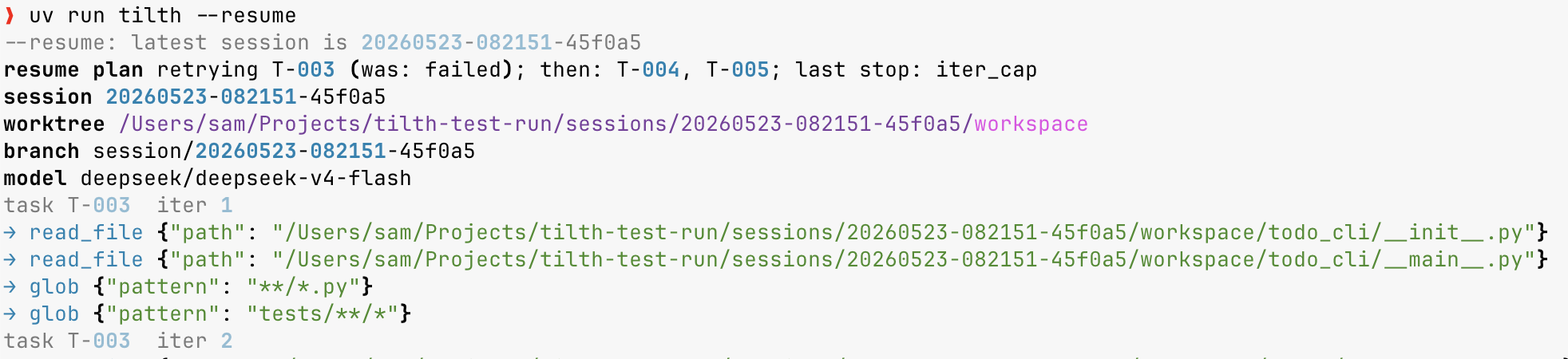
The plan banner spells out what's about to happen: T-003 retried with a fresh iteration budget, then T-004 and T-005 in order. The iteration counter restarts at 1 — the bumped cap gives the retry 16 iterations instead of the 8 that ran out.
What resume does
- Re-reads the feature from your repo. Task content always comes from the feature directory you ran (
<repo>/.tilth/<feature>/, never cached in the session), so a description you sharpen between runs is live on the retry. Tasks already markeddoneinsessions/<id>/task-status.jsonare skipped. - Retries the trailing failed task, if any. Iter-cap, evaluator-cap, and no-case stops mark the in-flight task
failedand write aFAILED (...)placeholder commit; resume flips it back topendingand unwinds the placeholder so the retry sees the partial work as uncommitted changes — the evaluator then gets one cumulative diff, not just the new edits. Wall-clock and dollar-spend caps stop between tasks, so there's no failed task to unwind. - Re-reads the per-task ledger. The evaluator's prior verdicts survive on disk, so a retry shows both sides the verdict history from the run before — even though the conversation is gone. See The worker↔evaluator dialogue.
- Resets the wall-clock budget for this resume — otherwise a resume the next day would trip
TILTH_MAX_WALL_CLOCK_MINUTESimmediately. - Preserves the spend total. If the original run hit
TILTH_MAX_TOKEN_DOLLAR_SPEND, bump it in~/.tilth/.envbefore resuming or the new run stops on the first spend check.
Under the hood
On wake, Session.wake() (session.py) reads checkpoint.json to reconstruct tokens_used, source, workspace, and branch, and resets started_at (wall-clock is per-resume). do_resume_cmd (loop.py) re-reads the feature, then _prepare_resume() reads the trailing stop event to learn how the last run ended: any failed task is flipped back to pending and ws.unwind_failed_commit() (workspace.py) soft-resets the FAILED (...) placeholder so the partial work returns to the index. A session_resume event records the structured plan (last_stop, retried, pending, unwound_commit) — the resume parallel of session_start, auditable from events.jsonl alone.
Resume doesn't loop endlessly: if a retried task hits a task-halting stop again, the outer loop halts with that reason just like the original run, and the next tilth resume would retry once more. Each resume is a fresh ride through the same loop.
Getting the work out
When a run finishes, the commits live on the session/<id> branch — but that branch is checked out in the worktree under ~/.tilth/sessions/<id>/workspace/, not in your repo. Reaching for it the obvious way fails:
$ git switch session/20260626-101715-1f38db
fatal: 'session/20260626-101715-1f38db' is already used by worktree at
'/Users/you/.tilth/sessions/20260626-101715-1f38db/workspace'
That's git refusing to check out a branch that's already live in another worktree — see Why a worktree, not just a branch. There are two ways forward, and the run summary prints both:
Work with it locally — cd into the worktree, where the branch is already checked out:
Send it to a remote for review:
tilth push                 # push session/<id> to origin (latest session)
tilth push <session_id>    # or name one; --remote NAME for a non-origin remote
tilth pr                   # ensure the branch is on the remote, then open a PR
tilth pr --base develop    # PR against a non-default base; --web to skip gh
tilth pr is hybrid: with the gh CLI installed and authenticated it creates the PR and prints its URL; otherwise (or with --web) it pushes the branch and prints the GitHub compare URL for you to open the PR yourself. Both commands are opt-in and user-invoked — Tilth never pushes during a run, and never merges (the session/* branch is yours to review like any other). The PR base defaults to the remote's tracked default branch, then main.
For a run that stopped short (a cap, an interrupt, or a failed task), the summary points at tilth resume instead — finish the work first, then publish.
Under the hood
do_push_cmd / do_pr_cmd (loop.py) mirror resume's resolution (latest session by default → Session.wake()), then operate on the source repo recovered from the checkpoint: ws.push_branch() runs git push -u, while ws.remote_url() / ws.branch_on_remote() / ws.default_remote_branch() (workspace.py) gate the PR step. gh pr create is shelled out only when gh is on PATH; otherwise ws.remote_web_url() builds the compare link. None of it runs inside the loop.
Cleansing — keep the record, retire the rest
Once a session's branch is merged or pushed, you usually don't need its worktree and session/<id> branch anymore — but you'll often want to keep the run's audit record (the events.jsonl and friends) so you can still replay it in tilth visualize. That's what tilth cleanse is for — the safe counterpart to reset:
tilth cleanse                # the latest session
tilth cleanse <session_id>   # or name one explicitly
tilth cleanse --yes          # skip the y/N confirmation
It removes the worktree (and its .git/worktrees/workspace* admin entry) and deletes the session/<id> branch, but keeps ~/.tilth/sessions/<id>/ and marks the run archived. tilth info then shows it as archived (rather than an alarming missing worktree), and the visualizer still lists and replays it.
Like reset, cleanse prints what it's about to remove (status, branch, the worktree it deletes, the record it keeps) and waits for a [y/N] confirmation — the bare form defaults to the latest session, which is often the one you're still working in, so the prompt is the guard against retiring the wrong run. Pass --yes to skip it. Re-running on an already-cleansed session is a calm no-op.
Unlike reset, cleanse is gated: it refuses unless the branch is merged into another branch or present on a remote, so it can't silently drop unintegrated commits. If you merged the work only on the remote (e.g. via a PR), run git fetch first so cleanse can see it; if you genuinely want to throw the work away, use reset.
tilth cleanse |
tilth reset |
|
|---|---|---|
| Intent | retire finished, integrated work | discard unwanted work |
| Safety | refuses unless merged or pushed | force-removes anything |
Worktree + session/<id> branch |
removed | removed |
~/.tilth/sessions/<id>/ (audit record) |
kept | deleted |
Under the hood
do_cleanse_cmd (loop.py) wakes the session (like resume), checks ws.branch_integrated() (workspace.py — is the tip reachable from another local head or any remote-tracking ref), then ws.cleanse_session_state() removes the worktree + branch while leaving the dir. Session.mark_archived() sets archived: true in the checkpoint and an archived event lands in events.jsonl, so the record itself notes it was retired — the run-outcome status (all_done / failed) stays intact.
Resetting
tilth reset                  # most recent session
tilth reset <session_id>     # or name one explicitly
tilth reset --yes            # skip the y/N confirmation
tilth reset is destructive by design — it force-removes the worktree even if dirty, since its whole purpose is to discard a session's work. The [y/N] prompt (or --yes) is the only safety gate; once you confirm, the session is gone. There's no --all and no "keep events" mode.
A run lives on disk in two places (working tree under ~/.tilth/sessions/; branch in the source repo's .git — see Session layout), and reset tears down both halves:
- Reads
~/.tilth/sessions/<id>/checkpoint.jsonfor the worktree path and branch; reads thesession_startevent for the source repo path. git worktree remove --force <path>in the source repo.git branch -D session/<id>in the source repo (force-delete is correct for thesession/*namespace, which is never auto-merged).- Removes
~/.tilth/sessions/<id>/.
Each step is idempotent — already-missing pieces are reported as skipped, not errored, so you can run tilth reset against a half-cleaned-up state and it finishes the job.
Under the hood
Reset runs entirely outside the normal loop — no model calls, no evaluator. _read_checkpoint() recovers workspace and branch; _source_for_session() scans events.jsonl for the session_start event to recover the source repo; ws.reset_session_state() (workspace.py) performs the three teardown operations above. tilth reset discards ~/.tilth/sessions/<id>/, so it drops the ledgers too.
Manual fallback
If tilth reset itself can't run (e.g. the session metadata is missing), the manual recipe still works: